Keyboard-first TUI
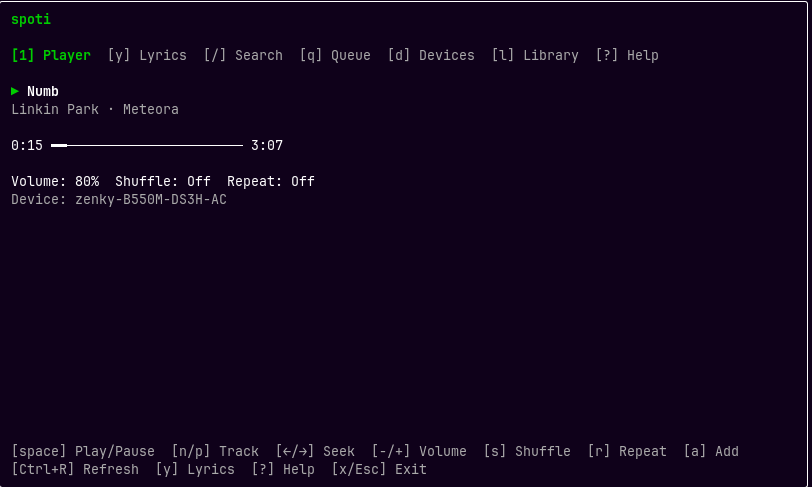
Player, Search, Queue, Devices, Library, Lyrics, and Help screens with responsive layouts, top tracks and artists, and playlist actions.
spoti interactive
Local-first · open source
A fast, keyboard-driven TUI and CLI for controlling Spotify through Spotify Connect. Search, play, queue, switch devices, manage playlists, browse your library, and follow synced lyrics without leaving the terminal.
npm install --global @bzenky/spoti
Requires Node.js 22+ and Spotify Premium for playback controls.
One tool, two modes
Open the interactive interface for exploration, or use focused commands in scripts and daily workflows.
Player, Search, Queue, Devices, Library, Lyrics, and Help screens with responsive layouts, top tracks and artists, and playlist actions.
spoti interactive
Control playback, inspect state, search Spotify, transfer devices, organize playlists, and manage your library one command at a time.
spoti now --short
Follow the current line in the TUI or fetch lyrics for the playing track and search results from LRCLIB.
spoti lyrics
CLI examples
Ordinary multi-word searches do not need quotes. Add --first when you want deterministic, non-interactive selection. Use spoti top tracks|artists to browse affinity rankings; --range short|medium|long selects roughly four weeks, six months, or one year. The tt and ta shortcuts open top tracks and top artists directly.
$ spoti play Fear of the Dark
$ spoti pause
$ spoti launch
$ spoti seek +30
$ spoti restart
$ spoti volume 50
$ spoti queue "Faint" --first
$ spoti playlist-create "Road trip"
$ spoti playlist-edit "Road trip" --name "Road trip 2026"
$ spoti playlist-move "Road trip" 12 3
$ spoti top tracks --range short
$ spoti tt --range long
$ spoti ta
$ spoti add "Workout" --search "Numb" --first
$ spoti device "My Computer" --default
$ spoti open
$ spoti lyrics Numb Linkin Park
$ spoti liked --limit 10[1] Player [y] Lyrics [/] Search [q] Queue
Current track — Example Artist
A quiet line drifts into view
▶ The next beat meets the cursor
And the screen keeps time with you
Lyrics from LRCLIB: https://lrclib.net
[↑/↓] Scroll · [f] Following · [Esc] Back · [Ctrl+X] Exit
Setup
spoti uses OAuth Authorization Code with PKCE. Your public client ID and credentials stay in your local configuration; no client secret is needed or accepted.
Open Spotify Developer DashboardIn the Spotify Developer Dashboard, create an application and add this exact redirect URI:
http://127.0.0.1:43821/callbackUse 127.0.0.1 exactly—not localhost and not a wildcard.
npm install --global @bzenky/spotispoti setup
spoti loginAuthentication opens Spotify’s authorization page in your browser.
spoti interactiveGood to know
spoti controls an existing Spotify client or Connect device. It does not stream or download audio, so an available playback device is required. Run spoti launch to open the local Spotify app; remote devices must still be opened separately. The Devices screen preselects the active device, shows defaults and unavailable devices, and can reveal device IDs for duplicate names.
Spotify Premium is required for playback-control commands, and a development-mode app’s owner must have Premium. Development mode has a small user allowlist and quota may be shared across apps owned by one developer account; each user should create their own app. Longer quota waits exit with a retry time.
Spotify does not provide lyrics through its Web API. Only when lyrics are requested, spoti sends the track title, artists, album, and duration to the community-run LRCLIB service. Lyrics are loaded live and not persisted locally.
Lyrics are shown with LRCLIB attribution for personal, immediate use. LRCLIB’s software license does not grant redistribution rights to copyrighted lyrics; availability and synchronization depend on community data.
This website uses Google Analytics to measure anonymous usage such as page views and referral sources. Google may process technical information including your IP address and browser data under its privacy policy.
Ready when you are